
Gantt Charts for Trello with Placker
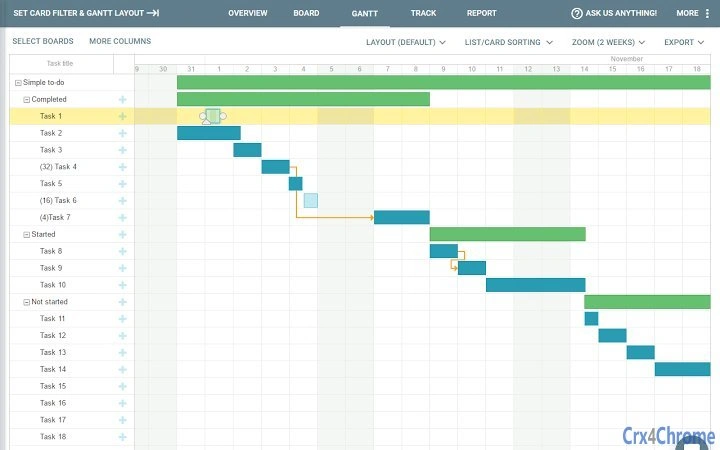
Placker é uma ferramenta de aprimoramento de gerenciamento de projetos projetada para integrar-se ao Trello, oferecendo visualização avançada por meio de diagramas de Gantt. Ela permite que os usuários transformem um ou mais quadros do Trello em uma visualização de linha do tempo unificada, ajudando as equipes a acompanhar o progresso planejado versus o real. O software é ideal para gerentes de projeto, equipes ágeis e colaboradores remotos que dependem do Trello para organizar fluxos de trabalho, mas precisam de melhor visibilidade de cronogramas.
Ao consolidar vários quadros em um único diagrama de Gantt, o Placker simplifica o acompanhamento de projetos complexos. Os usuários podem identificar dependências de tarefas, monitorar a distribuição de carga de trabalho e ajustar cronogramas dinamicamente. A ferramenta suporta colaboração em tempo real ao sincronizar atualizações entre Trello e Placker, garantindo consistência entre as plataformas. É particularmente útil para equipes que gerenciam projetos simultâneos com cronogramas sobrepostos ou que estão migrando de ferramentas tradicionais de planejamento para um fluxo de trabalho mais visual e ágil.
O desenvolvedor não forneceu informações adicionais sobre a empresa ou a equipe por trás do Placker. No entanto, o produto é mantido ativamente, com atualizações regulares que refletem melhorias na funcionalidade e na experiência do usuário. Os usuários podem esperar aprimoramentos contínuos com base no feedback, já que a equipe de desenvolvimento enfatiza a capacidade de resposta por meio do suporte dentro do aplicativo. Isso torna o Placker uma solução adequada para equipes que desejam ampliar as capacidades do Trello sem mudar de plataforma.
Key Features & Capabilities
- Unified Gantt Chart View – Combine one or more Trello boards into a single timeline, enabling cross-board project tracking and alignment of deliverables.
- Timeline Comparison – Visualize planned versus actual task durations to identify delays and adjust project schedules proactively.
- Dependency Management – Define task dependencies to ensure logical sequencing and prevent scheduling conflicts.
- Customizable Layouts – Rearrange cards and adjust the order of tasks to match team workflows or project phases.
- Workload Insights – Monitor team member workloads to balance assignments and prevent burnout.
- Advanced Filtering – Apply filters to display only relevant tasks, such as specific assignees, due dates, or status tags.
- Export & Import Capabilities – Export Gantt charts to PDF, PNG, iCal, MS Project, or spreadsheet formats; import updates back into Trello via spreadsheet.
- Multi-Board Dashboard – Manage multiple boards in a single view, improving oversight for complex, multi-project environments.
These features allow users to move beyond Trello’s standard Kanban interface by adding temporal context to their workflows. For example, a product team can track sprint progress across multiple boards while identifying bottlenecks. A project manager can use dependency tracking to ensure that design tasks are completed before development begins. The export functionality supports integration with other tools, making it easier to share project status with stakeholders outside the Trello ecosystem.
User Interface, Workflow & Performance
The interface of Placker is designed to complement Trello’s existing layout, with a clean and intuitive dashboard that overlays Gantt chart functionality. Navigation is streamlined through a central toolbar that provides access to chart views, filters, and export options. Users can toggle between Kanban and Gantt views with minimal friction, maintaining consistency in their daily workflow.
Workflow efficiency is enhanced by the ability to manage tasks, dependencies, and timelines in a single pane. The tool supports drag-and-drop adjustments for task dates and dependencies, enabling quick re-planning. However, the developer did not specify resource usage details, so actual CPU or RAM consumption during operation remains unknown. Performance observations are based on general software behavior patterns, suggesting stable operation under typical conditions.
Stability appears to be maintained through regular updates, including fixes for UI inconsistencies such as incorrect icon displays. The latest version, 1.05.1, includes improved onboarding pop-ups to guide new users through the initial setup process. While no performance benchmarks were provided, the lightweight size of 1.2 MB suggests minimal system impact. Users can expect responsive interactions, particularly when working with a moderate number of tasks.
Compatibility & System Requirements
Placker is compatible with Windows, Mac, and Linux operating systems, allowing broad accessibility across desktop environments. The software operates as a browser extension, meaning it runs within standard web browsers such as Chrome, Firefox, or Edge, without requiring native installation on the host system.
The installation size is listed as 1.2 MB, indicating a lightweight footprint. This small file size contributes to fast loading times and minimal storage impact. However, exact system requirements were not listed, including minimum browser versions or hardware specifications. Platform compatibility information is limited to the supported operating systems, with no mention of specific browser compatibility.
Users should ensure their system supports modern web standards and JavaScript execution, as the extension relies on these to render dynamic content. No additional plugins or third-party dependencies were specified. The software is designed to work seamlessly with Trello, which requires an active internet connection.
Pros and Cons
Pros
- Seamlessly integrates with Trello, extending its functionality without requiring a platform switch.
- Offers a powerful Gantt chart view for visualizing timelines across multiple boards.
- Supports real-time updates and bidirectional sync with Trello via spreadsheet imports.
- Provides customizable layouts, filters, and workload tracking for tailored project oversight.
- Lightweight size (1.2 MB) ensures minimal system resource usage.
- Active development with regular updates and responsive in-app support.
Cons
- After a 15-day free trial, continued use requires a subscription, which may limit long-term access for casual users.
- Exact system requirements and browser compatibility details were not provided.
- Performance under heavy workloads or large datasets was not specified.
- Dependent on internet connectivity for full functionality.
- No information on offline mode or local data storage.
FAQ Section
Is Placker compatible with all Trello boards?
Placker is designed to work with Trello boards that are accessible through your account. It supports multiple boards within a single Gantt view, but compatibility depends on Trello’s API availability and your board permissions.
Can I use Placker without an internet connection?
Placker requires an active internet connection to access Trello and synchronize data. The tool does not currently support offline mode or local data storage.
What happens after the 15-day free trial ends?
After the 15-day trial period, a subscription is required to continue using Placker. The subscription model enables access to all features and ongoing updates.
How often are updates released?
Updates are released regularly, with recent versions including bug fixes and feature enhancements. The development team emphasizes active maintenance and responsiveness to user feedback.
Is Placker officially affiliated with Trello or Fog Creek?
No, Placker is not related to Trello or Fog Creek Software in any official capacity. It is an independent tool developed to enhance Trello’s capabilities.
Final Thoughts + CTA
Placker delivers a robust enhancement to Trello by introducing comprehensive Gantt chart functionality, ideal for teams that need visual timeline management. Its ability to unify multiple boards, track dependencies, and export data makes it a valuable asset for project planning and monitoring. While the subscription model after the trial may deter some users, the tool’s active development, strong feature set, and seamless integration justify its value for serious project managers.
For professionals managing complex, multi-board projects within Trello, Placker offers a powerful upgrade path. It transforms Trello from a simple Kanban tool into a full-fledged project management platform. With ongoing improvements and responsive support, Placker continues to evolve as a trusted companion for agile and hybrid teams.
Download Gantt Charts for Trello with Placker now







